
Installation
Installation guide for guild-based analysis of 16S-rRNA sequencing data based on Wu and Zhao et al., 2021.

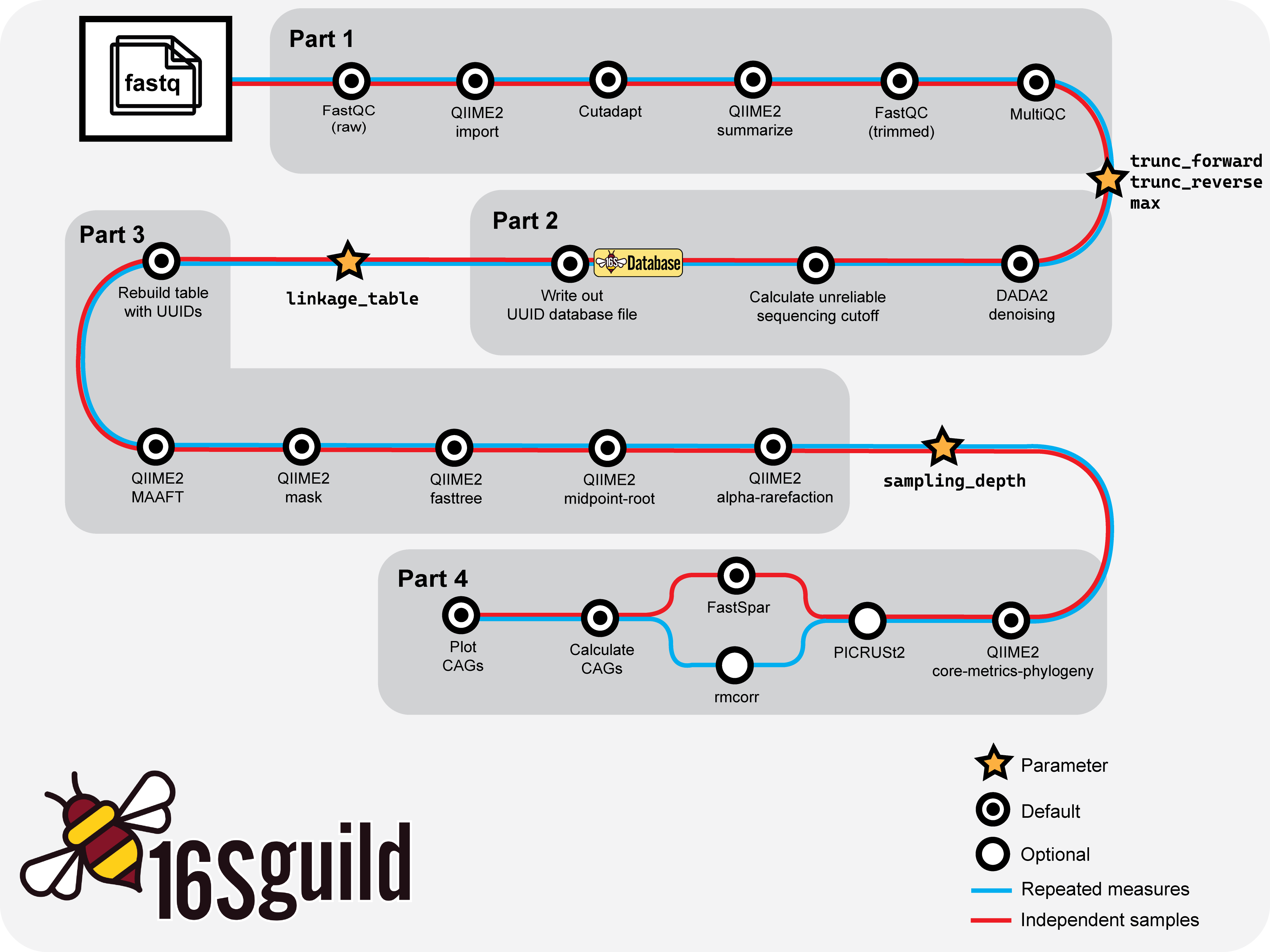
Basic workflow overview of 16Sguild pipeline.
Installation
The following sections detail dependencies and installation instructions for usage of the 16Sguild pipeline.
Dependencies
Nextflow
To use 16Sguild, users must have Nextflow installed (version 25.04 through 26.04). Please see Nextflow documentation for installation instructions.
Apptainer/Singularity/Docker
16Sguild runs all tools inside containers, so users must have one of Docker, Singularity, or Apptainer installed and available on PATH. No manual installation of the underlying bioinformatics tools is required—containers are pulled automatically when the pipeline runs (see Containers for the list of images used).
Running 16Sguild
When launching the pipeline, tell Nextflow which container engine to use with the -profile flag: docker, singularity, or apptainer. HPC users can instead select one of the profiles defined in conf/ (e.g. for SLURM); see your cluster's Nextflow configuration for details.
Run directly from GitHub (suggested):
nextflow run zhao-microbiome-lab/16Sguild -params-file examples/params.yml -profile docker
Or, clone the repository and launch the pipeline:
git clone https://github.com/zhao-microbiome-lab/16Sguild.git
cd 16Sguild
nextflow run main.nf -params-file examples/params.yml -profile docker
Verifying Your Installation
Confirm Nextflow and your container engine are installed and on PATH:
nextflow -version
docker --version   # or: singularity --version / apptainer --version
Then do a quick end-to-end run against the bundled test dataset:
nextflow run zhao-microbiome-lab/16Sguild -profile test,docker
The test profile runs a minimal dataset and completing without errors confirms your Nextflow and container setup are working correctly.